
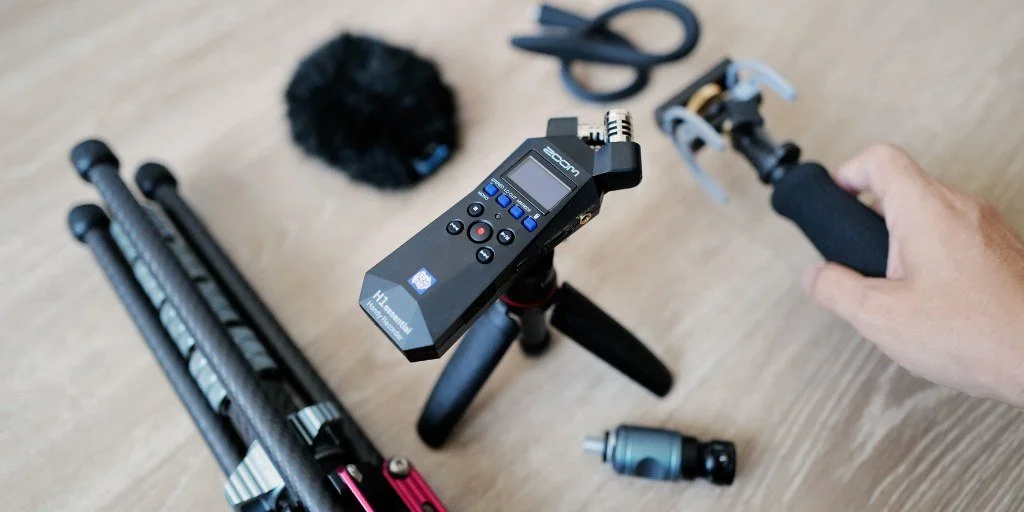
Most first shows do not fail because the host lacks ideas. They fail because the audio feels thin, uneven, or stressful to manage. That is why this portable recorder is catching attention with beginner podcasters across the USA who want better sound without building a studio before episode one. The Zoom H1essential lands in that sweet spot between phone recording and a full mixer setup. It gives creators a way to capture clear voice, room tone, interviews, and quick notes without turning podcast recording into a weekend-long tech lesson. For readers who follow creator gear trends and media updates, the appeal is easy to spot: the device removes one of the biggest early fears. You can press record and focus on the conversation. That does not make it magic. Bad rooms still sound bad. Poor mic placement still hurts. But for a first-time host in a spare bedroom, dorm room, apartment office, or parked car, the H1essential makes starting feel less fragile.
Why This Portable Recorder Feels Made for First Shows
The first barrier for a new podcast is not always money. It is confidence. A beginner can spend days watching setup videos and still feel frozen when the red light comes on. The Zoom H1essential works because it lowers the number of decisions you must make before recording a usable take.
Why beginner podcasters care less about gain knobs now
Old starter recorders often punished new users for guessing wrong. Set the gain too high, and laughter could clip. Set it too low, and the voice needed heavy repair later. That one setting caused more stress than most beginners expected.
The H1essential’s 32-bit float recording changes that starting point. Zoom states that the device records in 32-bit float, which gives users more room to recover audio levels after recording on the official Zoom H1essential product page. For a new host, that means a loud guest, a sudden laugh, or a closer-than-planned voice is less likely to ruin the session.
There is a quiet lesson here: easier gear can make you a better host. Not because the device teaches interviewing, but because it keeps your brain out of panic mode. You hear the guest more. You interrupt less. You stop staring at meters like they are a test score.
The room matters more than the menu
A recorder cannot save a marble kitchen, a bare office, or a room with traffic leaking through old windows. That sounds discouraging until you flip it. The H1essential gives beginner podcasters enough control that the next smart move becomes simple room choice, not another purchase.
A closet full of coats may beat a polished desk setup. A carpeted bedroom at 9 p.m. may beat a sunny living room beside a window AC unit. One podcaster in Chicago could get cleaner results from a low-cost tripod on a soft rug than from a fancy desk in a glassy apartment corner.
The non-obvious part is that basic gear can reveal bad habits faster. If your voice sounds hollow, the recorder is not always the problem. It may be sitting too far away. It may be pointed at a wall. It may be catching laptop fan noise because the laptop is closer than your mouth.
The 32-Bit Float Audio Advantage Is Not What Buyers Think
A lot of shoppers see 32-bit float audio and assume it means “pro sound.” That is not the right way to think about it. The better angle is forgiveness. It gives new creators more room to make normal human mistakes without losing the whole take.
Why 32-bit float audio helps messy first takes
First episodes are rarely calm. You test the intro three times, then speak too softly when the real recording starts. A friend joins as a guest and laughs louder than expected. You move your chair. You tap the desk. The dog barks once and then acts innocent.
32-bit float audio helps because those changes in loudness are easier to handle later than on many older beginner devices. It does not mean every sound becomes beautiful. It means the recording has more usable information when you bring it into editing software.
That matters for podcast recording because a first-time host often records alone. There is no producer watching meters. No engineer fixing levels. No second person saying, “Move the recorder closer before we start.” The gear has to tolerate the mess.
What it does not fix
The H1essential will not remove echo from a hard room. It will not make a guest speak closer to the mic. It will not turn a noisy coffee shop into a broadcast booth. This is where buyers need a clear head.
A better recording starts with simple behavior. Put the device near the speaker. Keep hands off the table. Turn off fans. Record a short test and listen before the whole conversation begins. That five-minute check can save an hour of repair.
The counterintuitive truth is that the H1essential may be most useful when you use fewer features. A new creator does not need to touch every function on day one. Start with a stable position, a close speaking distance, and a quiet room. Add the rest later.
How the H1essential Fits a Real American Starter Setup
Most new shows in the USA are not born in studios. They start in apartments, spare bedrooms, college housing, basements, small offices, and parked SUVs during lunch breaks. The H1essential fits that reality because it can serve several roles before the host buys more gear.
Podcast recording on a desk, couch, or kitchen table
For a solo show, the easiest setup is simple. Place the H1essential on a mini tripod, keep it close to your mouth, and speak across it rather than breathing straight into it. That small angle can soften plosives and mouth noise.
For two people at one table, the 90-degree X/Y mic design is useful when both speakers sit in a careful position. It is not the same as giving each person a separate mic, but it can work for a casual interview, a test episode, or a short local story segment. Think of a real estate agent interviewing a lender in a home office, or a high school coach recording a season recap with a parent volunteer.
This is also where starter microphone buying guide and podcast room setup tips make sense as future internal links. The recorder solves capture. The rest of the setup solves comfort, consistency, and repeatable sound.
When a lavalier makes more sense
The built-in mics are not always the right choice. A lavalier can make more sense when the speaker moves, turns their head, or sits in a noisy room. Zoom lists a 3.5 mm mic/line input on the H1essential, which gives creators another path for dialogue capture.
That flexibility helps beginner podcasters who also shoot video. A creator filming short interviews at a farmers market in Austin may want a clip-on mic for the guest. A fitness coach in Phoenix may want to record voice notes away from the camera. A teacher in Ohio may use the recorder for class project audio, then bring it back for a weekend podcast.
The smart move is not buying every accessory at once. Start with the recorder. Add a windscreen if you record outside. Add a lavalier when your subject moves or when the room keeps beating your voice.
The Viral Pull Comes From Removing Fear, Not Adding Features
Gear goes viral for many reasons. Sometimes it is hype. Sometimes it is a discount. Sometimes a product catches fire because it answers a fear people were too embarrassed to name. The H1essential’s draw is that it makes audio feel less like a gatekeeping ritual.
Beginner podcasters need fewer choices at first
The first month of a show should teach you your format, not your tolerance for menus. You need to learn whether your episodes should be 12 minutes or 35. You need to hear whether your intro feels stiff. You need to know if guests interrupt each other.
A device with fewer traps helps. The H1essential has a clear screen, physical controls, marker functions, USB-C use, and enough recording safety to let new hosts work without feeling buried. That does not make it the final stop for every creator. It makes it a strong first serious step.
The odd insight is that limitation can be a gift. With one compact recorder, you stop redesigning the studio every week. You record more. You hear your mistakes faster. You improve because the setup does not keep changing.
Where it beats a phone and where it does not
A phone is still useful. It is always with you, and for quick notes, it may be enough. But phones are built for many jobs. Notifications, hand noise, storage issues, app settings, and mic placement can make them less dependable for a planned episode.
The H1essential beats a phone when the goal is repeatable podcast recording. You can mount it, monitor it, use removable storage, and keep the device dedicated to audio. That focus matters when you are building a weekly habit.
Still, a phone can win for speed. If the choice is between capturing a strong idea now or waiting for the recorder at home, use the phone. The best creators do not worship gear. They match the tool to the moment.
Conclusion
The Zoom H1essential is gaining attention because it meets new creators where they are. It does not demand a treated room, a mixer, or a pile of cables before the first episode exists. It gives enough quality and enough forgiveness to make the early stage feel possible. A portable recorder will not create a strong show by itself, but it can remove the technical dread that keeps many good ideas stuck in draft mode. For beginner podcasters, that matters more than another shiny feature. Start with a quiet space, place the mic with care, record a test, and listen back without ego. Then publish, learn, and record again. The first setup should help you build a rhythm, not become another reason to delay. If your show has been waiting on “better gear,” this may be the sign to start with what is clear, simple, and ready.
Frequently Asked Questions
How much does the Zoom H1essential usually cost?
The price often sits near the lower end of serious handheld audio gear, though it can change by retailer, bundle, and sale timing. Check major US stores before buying because accessory packs, memory cards, and windscreens can affect the real value.
Is the Zoom H1essential good for beginner podcasters?
Yes, it suits new hosts who want better sound than a phone without learning a full studio setup. Its 32-bit float audio gives extra safety for uneven speaking levels, which helps during early interviews and solo episodes.
Can I use the Zoom H1essential as a USB microphone?
Yes, it can work as a USB microphone through USB-C with a computer or mobile device. That makes it useful for remote calls, voiceovers, and simple desk recording when you do not want a separate USB mic.
Do I need an external mic with the Zoom H1essential?
No, the built-in X/Y mics can record voices, room tone, and interviews. An external lavalier helps when the speaker moves, sits farther away, or records in a place where closer mic placement would improve clarity.
Is 32-bit float audio worth it for podcasting?
Yes, mainly because it gives new creators more room to fix level mistakes after recording. It does not remove echo, background noise, or poor mic placement, so the room and distance still matter.
What accessories should I buy first?
A mini tripod and a windscreen are the most useful early add-ons. A memory card is needed for standalone recording, and headphones help you catch noise before recording a full episode.
Can the Zoom H1essential record two people at once?
Yes, it can record two nearby speakers with careful placement, especially across a small table. For cleaner guest separation, two separate microphones or a multi-input recorder may work better later.
Is the Zoom H1essential better than recording on a phone?
For planned episodes, yes. It gives a more focused audio workflow, better mounting options, dedicated controls, removable storage, and safer level handling. A phone still works for quick ideas or emergency backup clips.