
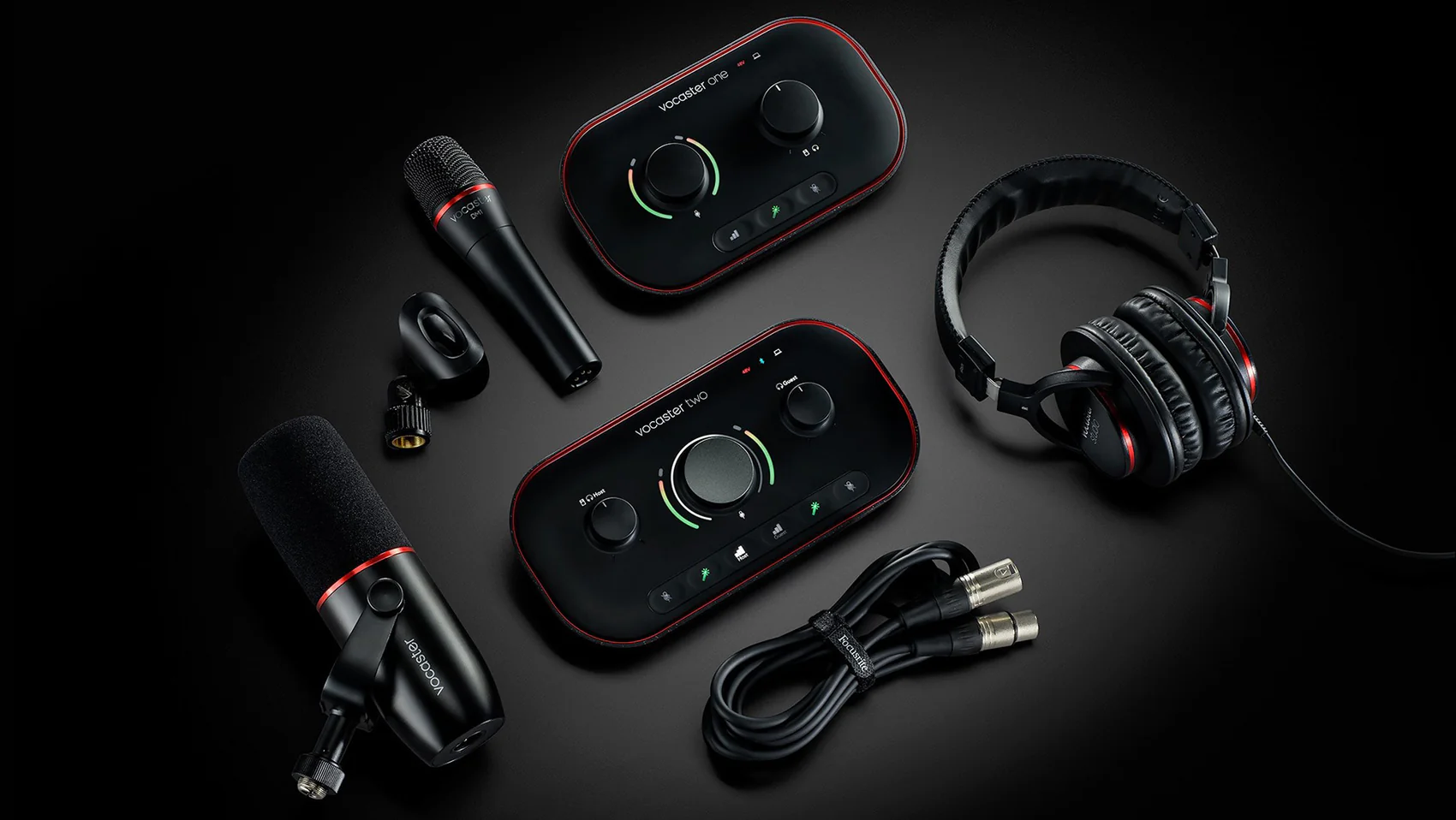
A good creator deal does not feel loud at first. It feels practical. That is why the Focusrite Vocaster Two Podcast Interface deal is getting attention from U.S. podcasters, YouTubers, church media teams, remote interview hosts, and small business creators who want cleaner voice audio without building a studio from scratch. The draw is not only the lower tag. It is the way the kit removes three early headaches at once: two mic inputs, two headphone outputs, and simple voice controls for people who do not want to fight menus before recording. For creators comparing gear alerts through digital media buying updates, this kind of drop stands out because it hits a real pain point, not a vanity upgrade. A podcast recording bundle matters most when it saves you from piecing together the wrong mic, cable, headphones, and audio box after the first episode already sounds thin. The Focusrite Vocaster Two was built for hosted conversations, so the value is strongest when you plan to record with a guest, co-host, client, or caller instead of talking alone into a USB mic forever.
Why This Podcast Interface Deal Feels Different for Home Shows
The old starter path was messy. You bought a USB mic, then added a second mic, then learned too late that two USB mics on one computer can create driver problems and timing issues. The better route is boring in the best way: use one audio unit built for two voices from the start. That is where this price drop earns its noise.
The deal matters because the second chair is no longer an upgrade
Most people do not think about the second chair until someone sits in it. A friend visits. A spouse joins one episode. A local Realtor wants to record a market chat. Suddenly the “solo” setup feels too small, and the creator starts shopping under pressure.
That is how bad purchases happen.
A two-person podcast setup changes the planning. You can give each speaker an XLR mic path and a headphone feed, which makes the session feel less like a laptop call and more like a small show. Focusrite lists the Vocaster Two Studio kit with two mic inputs, two headphone outputs, Auto Gain, Bluetooth connectivity, a dynamic mic, headphones, an XLR cable, and the main audio unit on its official Vocaster Two Studio page.
The non-obvious part is not the second input. It is the confidence it gives you before the guest arrives. You do not spend the first ten minutes explaining why only one person can hear playback. You do not ask someone to share headphones. You start with less awkwardness, and that shapes the whole conversation.
Bundle math beats buying scattered gear in a panic
A low price on one box can still be a bad deal if it forces five extra purchases. That is why a podcast recording bundle deserves a different kind of math. You compare the cost of the kit against the price of an audio unit, mic, headphones, stand, cable, and software comfort separately.
The bundle route does not have to be perfect to be useful. The included mic may not be your forever mic. The headphones may not be the pair you keep for five years. Yet for a creator recording a first interview series in a spare bedroom, finished beats theoretical.
Say you are launching a local sports show in Ohio with one host and one rotating guest. Buying one piece at a time looks flexible until the first Thursday night recording arrives and the missing cable becomes the whole story. A ready kit lowers that risk. It keeps the first episode from turning into a shopping lesson.
There is a small trap, though. A bundle can make you feel done when your room still sounds rough. A hardwood kitchen, bare office, or echo-heavy basement will expose any mic. The smarter move is to pair the gear purchase with simple room fixes, like a rug, curtains, and recording away from reflective walls. Gear gets you started. The room decides how polished you sound.
What the Vocaster Two Studio Kit Solves Before You Record
The best beginner audio gear removes decisions at the moment you are most likely to make them badly. Recording day is not when you want to learn gain staging, headphone routing, caller audio, and backup habits. The Vocaster approach is aimed at people who need the show to work before they understand every technical word behind it.
Auto Gain saves beginners from the first bad take
New creators often record too low because they are afraid of distortion. Then they boost the audio later and bring up hiss, room noise, and mouth clicks. Others record too hot, laugh once, and ruin the loudest moments. Both problems feel small until editing begins.
Auto Gain helps set a safer starting level. It is not magic, and it does not replace listening. Still, for a host who has never watched meters before, it can prevent the worst first mistake. Focusrite also lists a 70 dB gain range for the Vocaster Two family, which matters for common dynamic broadcast mics that need more clean gain than tiny travel units can provide.
Here is the human side. A guest will not wait while you read a forum thread about preamp noise. They will sip coffee, check their phone, and lose energy. Fast setup protects the mood in the room. That matters more than spec-sheet pride.
For a beginner podcast gear checklist, the first rule should be simple: choose equipment that helps you record a complete episode before chasing studio perfection. The Focusrite Vocaster Two fits that mindset because its controls speak to creators, not only engineers.
Phone calls, guests, and video feeds belong in the same plan
Modern shows are rarely one clean microphone into one laptop. A creator might bring in a caller, record a Zoom guest, send audio to a camera, and capture local voices in the same week. That is where many starter rigs start to feel patched together.
Vocaster Two includes phone and Bluetooth-friendly features built around that kind of workflow. The point is not to make every source sound identical. The point is to keep the host from building a nest of adapters every time the episode format changes.
A small business owner in Texas recording customer stories may need one in-person mic and one phone guest. A teacher making a parent-advice show may want to record into software while keeping a clean feed for video. A church media volunteer may need spoken audio for livestreams and short clips. Those are not exotic use cases anymore. They are normal creator life.
The counterintuitive lesson is that simple gear can support more formats than complex gear when the layout is made for the task. A large music mixer may look serious on a desk, but it can slow down a beginner who only needs two voices, a caller, and predictable monitoring. The right tool is the one that keeps you recording.
Who Should Buy the Focusrite Vocaster Two While Prices Are Low
A sale should not bully you into buying gear. It should match a job you already need done. The Focusrite Vocaster Two is strongest for creators who expect conversation, not only narration. That difference matters because many people buy audio tools based on today’s episode while ignoring the show they want six months from now.
New co-hosts get the cleanest win
The easiest recommendation is for two hosts who record in the same room. One audio unit, two XLR paths, two headphone feeds, and fewer computer headaches. That is the core promise, and it is where the deal makes the most sense.
A two-person podcast setup also improves the social side of recording. Each person can hear the show. Each person gets their own mic position. Nobody feels like the guest squeezed into a solo creator’s corner. The result is not only better sound. It is better behavior at the table.
Think about a husband-and-wife personal finance show in North Carolina. If both hosts hear themselves well, they stop leaning across the desk, interrupt less by accident, and trust the recording. That comfort shows up in the edit. It can make a low-budget show feel planned.
The hidden win is consistency. When both voices run through the same unit, your episodes have a steadier character. You still need mic technique, but you are not blending a USB mic on one side with a laptop mic on the other. That mismatch is one of the fastest ways to sound amateur.
Solo creators with guests get room to grow
Solo creators should not dismiss this kit. Many shows start alone and become interview-based after the host finds an audience. Buying for that future can make sense when the price falls low enough.
The key is honesty. If you will record only solo voiceovers for the next year, a smaller unit or strong USB mic may be enough. If your plan includes clients, guest experts, local interviews, livestream partners, or reaction videos with a second speaker, extra input room is not waste. It is insurance.
For a podcast recording bundle, the question is not “Can I use every part today?” The better question is “Will this stop me from rebuying my setup when the show grows?” That is where the Vocaster Two becomes more convincing.
One warning belongs here. Do not buy a two-host kit because it looks more professional on a desk. Buy it because your format needs it. Audio gear is full of objects that feel productive before they do anything useful. The best purchase disappears into the work.
A related home studio setup guide should cover the parts people forget: mic distance, quiet power, desk noise, backup recording, and where to sit in the room. Those choices can matter as much as the box you buy.
How to Check the Bundle Price Without Chasing Hype
Deal culture moves fast, and audio listings can be strange. One retailer may discount the solo unit. Another may discount the Studio kit. A marketplace seller may show a low tag but add shipping, missing accessories, or weak return terms. The smart buyer slows down for five minutes before checkout.
Look at total setup cost, not the sticker
A true low price is not only the number on the product page. It is the number after you add the missing pieces. For the Studio kit, check whether the mic, headphones, XLR cable, and USB cable are included. For the standalone unit, price those items separately.
Current retailer pages have shown deep discounts on Vocaster models, including limited-time savings on the standalone Vocaster Two at major U.S. music retailers. Sweetwater, for example, has listed the standalone Vocaster Two at a sale price far below its prior price during a timed promotion. Amazon listings have also shown shifting marketplace pricing and purchase activity, which is why checking seller, shipping, and return status matters before treating any one tag as final.
Here is the practical test. Build a small checkout list with the exact items you need for episode one. Then compare that against the bundle. If the gap is small, choose the path with fewer compatibility questions. If the gap is large and you already own a better mic or headphones, the standalone unit may be smarter.
A record-looking deal can still lose if it leaves you short one cable on recording day. That sounds silly until it happens.
Know when a cheap kit is the wrong kit
The wrong buyer for this unit is easy to spot. They need four local microphones. They want multitrack music recording with instruments. They expect advanced routing for a studio full of gear. For that person, a creator-focused box may feel narrow.
That is not a flaw. It is a boundary.
The Focusrite Vocaster Two was made around spoken content. If you are recording guitars, drums, MIDI gear, and vocal takes, Focusrite’s Scarlett line or another studio unit may fit better. If you are recording host-and-guest speech, short video voice tracks, coaching calls, interviews, or livestream commentary, the Vocaster’s narrower focus becomes a strength.
The non-obvious buying move is to avoid paying for flexibility you will never touch. Many beginners think more inputs mean a wiser purchase. Often, more inputs mean more desk space, more confusion, and more ways to misroute audio. A clear two-voice box can beat a larger unit when the work is simple and repeated.
Before buying, check three things: return window, included accessories, and whether the listing is for Vocaster Two or Vocaster Two Studio. Those names are close enough to confuse tired shoppers. The Studio version is the kit. The standard version is the unit. That difference decides whether the price is a bargain or only half the setup.
Conclusion
Lower prices make creators move, but smart creators still ask what the gear will solve. This deal is worth watching because it meets a real format shift: more people are recording conversations, not solo monologues. The Focusrite Vocaster Two Podcast Interface matters because it gives small U.S. creators a cleaner way to host guests without turning the first setup into a technical project. It is not the right answer for every studio, and it will not fix a noisy room or a weak recording habit. Yet for a two-person show, a local interview series, or a creator planning to grow past one mic, the value is easy to understand. Check the exact listing, compare the kit against your missing pieces, and buy only if it serves the next ten episodes, not the excitement of the discount. Start with the format, then choose the gear that lets you press record with less friction.
Frequently Asked Questions
How much should I pay for the Focusrite Vocaster Two bundle?
A strong deal depends on whether you are buying the Studio kit or the standalone unit. Compare the checkout price against the cost of a mic, headphones, XLR cable, and audio unit bought separately. The lowest-looking listing is not always the best value.
Is the Vocaster Two good for two-person podcasts?
Yes, it suits host-and-guest shows because it has two mic inputs and two headphone outputs. That helps both speakers hear the session and record through one audio path. It is a better fit than trying to run two separate USB mics.
What comes with the Vocaster Two Studio kit?
The Studio kit includes the main Vocaster Two unit, a Focusrite dynamic mic, closed-back headphones, an XLR cable, and a USB cable. Always confirm the retailer listing, because used, open-box, and marketplace offers may not include every accessory.
Is the Focusrite Vocaster Two better than a USB microphone?
It depends on your format. A USB mic can be fine for solo voice work. Vocaster Two makes more sense when you need XLR mics, a guest setup, headphone monitoring, and room to handle calls or creator workflows with fewer workarounds.
Can beginners use the Vocaster Two without audio experience?
Yes, beginners can use it because the controls are made for spoken content rather than music-studio routing. Auto Gain and voice features help reduce early mistakes. You still need good mic placement, a quiet room, and a short test recording.
Does the Vocaster Two work for livestreaming?
Yes, it can support livestreaming, podcast recording, video voice work, and online interviews. The best results come when you test your streaming software before going live. Check input selection, headphone monitoring, and caller audio before the session starts.
Should I buy the standalone unit or the Studio bundle?
Buy the standalone unit if you already own a good XLR mic and headphones. Choose the Studio bundle if you are starting from zero and want fewer compatibility choices. The bundle is often easier for first episodes and small creator teams.
What should I check before ordering a discounted Vocaster Two?
Check whether the listing is new, used, open-box, or marketplace-sold. Confirm included accessories, return terms, shipping cost, and model name. Vocaster Two and Vocaster Two Studio are not the same package, so read the product title carefully.